Mautic integration
These are examples of the Mautic integration feature which can be manually added to your site.
Send Mautic ID to Unomi
We use this snippet to get the visitor's Mautic ID and send it to Unomi:
<script>
    // enable namespace that handles the queue and methods
    window.dsdc = window.dsdc || function () { (dsdc.q = dsdc.q || []).push(arguments) }; dsdc.l = +new Date;

    // Now BEFORE each capture happens, we'll check if we can find a Mautic ID
    // and send it along with the capture data

    // this is the function that looks for the ID and appends it to the capture data
    var getMauticIdHandler = function (data) {
        // temp store our capture data & potential Mautic id
        var changedCapture = data.requestData;

        // Get the Mautic ID value with the mtcId function that can also be used in console. (returns undefined if it doesn't exist)
        var mauticId = window.mtcId;

        // append the ID to the capture if any found
        if (mauticId !== null && mauticId !== undefined) {
            changedCapture.te__mautic_id = mauticId;

            // send the changed data back to the main script
            dsdc.updateCapture(changedCapture);
        }
    }

    // This method will make sure to execute the function
    // BEFORE each capture is saved (so for every event)
    window.dsdc('beforeRequest', getMauticIdHandler);
</script>
Send Unomi profile segment UUIDs & human-readable names to Mautic
You need to create custom fields in Mautic to implement this example:
- 1 for the Unomi profile segment uuids
- 1 for the Unomi profile segment names
| Human readable label | Alias | Publicly updatable |
|---|---|---|
| personalisation segment uuid | personalisation_segment_u | Yes |
| personalisation segment label | personalisation_segment_l | Yes |
The labels and aliases seen above are examples. You can choose what label and alias you want to give your custom field. Keep in mind you will need to update the alias names in the snippet if your alias is not the same as the example.
We use this snippet to get the segment names and uuids from the visitor's Unomi profile and send them to Mautic:
<script>
    // enable namespace that handles the queue and methods
    window.dsdc = window.dsdc || function () { (dsdc.q = dsdc.q || []).push(arguments) }; dsdc.l = +new Date;

    // this is a function to be able to compare 2 objects with each other
    // we use it to check if the user's Unomi segments have changed
    function shallowEqual(object1, object2) {
        if (object1 == null || object2 == null) {
            return false;
        }
        const keys1 = Object.keys(object1);
        const keys2 = Object.keys(object2);
        if (keys1.length !== keys2.length) {
            return false;
        }
        for (let key of keys1) {
            if (object1[key] !== object2[key]) {
                return false;
            }
        }
        return true;
    }

    // this is the function that reads the profile segment uuids and human readable names and sends them to Mautic
    var sendToMauticHandler = function (data) {
        // create a string of all the uuids of the segments, separated by ", "
        var segmentsUuid = data.responseData.profile.profileSegments.join(", ");

        // if the user doesn't belong to a segment, use the standard value "_unknown"
        if (segmentsUuid == "") {
            segmentsUuid = "_unknown";
        }

        // create a string of all the names of the segments, separated by ", "
        var segmentsNames = data.responseData.profile.profileSegmentNames.join(", ");

        // if the user doesn't belong to a segment, use the standard value "_unknown"
        if (segmentsNames == "") {
            segmentsNames = "_unknown";
        }

        // get the last known segments from localStorage
        var localSegmentObject = localStorage.getItem("myStoredUnomiSegments");

        // if there are segments stored in localStorage, parse the output to get an object
        if (localSegmentObject != null) {
            localSegmentObject = JSON.parse(localSegmentObject);
        }

        // create an object to send to Mautic
        var mauticObject = {
            "personalisation_segment_u": segmentsUuid,
            "personalisation_segment_l": segmentsNames
        };

        // check if there are properties to send to Mautic and if the Unomi segments changed to only send the segments to Mautic if they changed (to reduce the amount of pageviews being sent to Mautic)
        if (Object.keys(mauticObject).length > 0 && !shallowEqual(mauticObject, localSegmentObject)) {
            // only send Mautic event if there is at least one property to be sent and if the segments changed (with this we also detect name changes of segments)
            mt('send', 'pageview', mauticObject);
            // save the object that we sent to Mautic in localStorage, to use this to check if something changed later on
            localStorage.setItem("myStoredUnomiSegments", JSON.stringify(mauticObject));
        }
    }

    window.dsdc('afterResponse', sendToMauticHandler);
</script>
Combination of sending Mautic ID to Unomi and Unomi profile segment UUIDs & names to Mautic
We use this snippet to get the visitor's Mautic ID and send it to Unomi, and to get the segment names and uuids from the visitor's Unomi profile and send them to Mautic:
<script>
    // enable namespace that handles the queue and methods
    window.dsdc = window.dsdc || function () { (dsdc.q = dsdc.q || []).push(arguments) }; dsdc.l = +new Date;

    // Now BEFORE each capture happens, we'll check if we can find a Mautic ID
    // and send it along with the capture data

    // this is the function that looks for the ID and appends it to the capture data
    var getMauticIdHandler = function (data) {

        // temp store our capture data & potential Mautic id
        var changedCapture = data.requestData;

        // Get the Mautic ID value with the mtcId function that can also be used in console. (returns undefined if it doesn't exist)
        var mauticId = window.mtcId;

        // append the ID to the capture if any found
        if (mauticId !== null && mauticId !== undefined) {
            changedCapture.te__mautic_id = mauticId;

            // send the changed data back to the main script
            dsdc.updateCapture(changedCapture);
        }
    }

    // This method will make sure to execute the function
    // BEFORE each capture is saved (so for every event)
    window.dsdc('beforeRequest', getMauticIdHandler);

    // If you want to minimize the amount of times this is done,
    // you can associate the Mautic retrieval with a specific event instead,
    // eg. on script load:
    // window.dsdc('beforeRequest', 'dom', getMauticIdHandler);

    // this is a function to be able to compare 2 objects with each other
    // we use it to check if the user's Unomi segments have changed
    function shallowEqual(object1, object2) {
        if (object1 == null || object2 == null) {
            return false;
        }
        const keys1 = Object.keys(object1);
        const keys2 = Object.keys(object2);
        if (keys1.length !== keys2.length) {
            return false;
        }
        for (let key of keys1) {
            if (object1[key] !== object2[key]) {
                return false;
            }
        }
        return true;
    }

    // this is the function that reads the profile segment uuids and human readable names and sends them to Mautic
    var sendToMauticHandler = function (data) {
        // create a string of all the uuids of the segments, separated by ", "
        var segmentsUuid = data.responseData.profile.profileSegments.join(", ");

        // if the user doesn't belong to a segment, use the standard value "_unknown"
        if (segmentsUuid == "") {
            segmentsUuid = "_unknown";
        }

        // create a string of all the names of the segments, separated by ", "
        var segmentsNames = data.responseData.profile.profileSegmentNames.join(", ");

        // if the user doesn't belong to a segment, use the standard value "_unknown"
        if (segmentsNames == "") {
            segmentsNames = "_unknown";
        }

        // get the last known segments from localStorage
        var localSegmentObject = localStorage.getItem("myStoredUnomiSegments");

        // if there are segments stored in localStorage, parse the output to get an object
        if (localSegmentObject != null) {
            localSegmentObject = JSON.parse(localSegmentObject);
        }

        // create an object to send to Mautic
        var mauticObject = {
            "personalisation_segment_u": segmentsUuid,
            "personalisation_segment_l": segmentsNames
        };

        // check if there are properties to send to Mautic and if the Unomi segments changed to only send the segments to Mautic if they changed (to reduce the amount of pageviews being sent to Mautic)
        if (Object.keys(mauticObject).length > 0 && !shallowEqual(mauticObject, localSegmentObject)) {
            // only send Mautic event if there is at least one property to be sent and if the segments changed (with this we also detect name changes of segments)
            mt('send', 'pageview', mauticObject);
            // save the object that we sent to Mautic in localStorage, to use this to check if something changed later on
            localStorage.setItem("myStoredUnomiSegments", JSON.stringify(mauticObject));
        }
    }

    window.dsdc('afterResponse', sendToMauticHandler);
</script>
DXP
In this example we will set up Unomi to keep track of visitors visiting the DXP marketing page, so we can create a segment to categorise those visitors, which we will also send to Mautic to update their contact information.
Snippet 1
We use this snippet to set a flag when the visitor interacts with the target page:
<script>
    // enable namespace that handles the queue and methods
    window.dsdc = window.dsdc || function () { (dsdc.q = dsdc.q || []).push(arguments) }; dsdc.l = +new Date;

    // track interaction with DXP marketing page
    window.dsdc('beforeRequest', function (data) {

        // temporary store our capture data & potential merge value
        var changedCapture = data.requestData;

        // check if the visitor interacted with the dxp marketing page
        if (changedCapture.surfing.te__pathName == "/en/dxp/dropsolid-experience-cloud-marketers") {
            // set flag
            changedCapture.bo__visitedPageDXP = true;
        }

        // use a global function to pass the modified capture back to the main script
        dsdc.updateCapture(changedCapture);
    });
</script>
Segment
The new property will be available when creating a segment when at least one profile has the new property, so we click once on the dxp marketing page in order for the flag to get in a profile.
Now that Unomi has this flag property, we can create a segment to start categorizing the visitors.
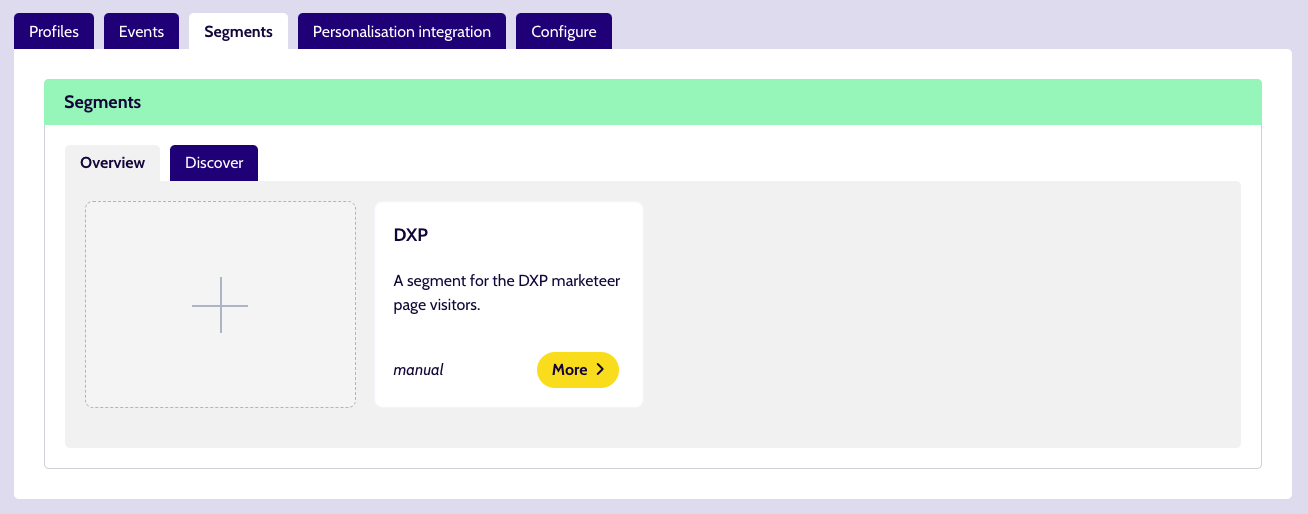
We create a segment which we name DXP. Here we add a rule which checks if the flag property is true, so if the visitor interacted with the DXP marketing page Unomi will assign this segment to the visitor.
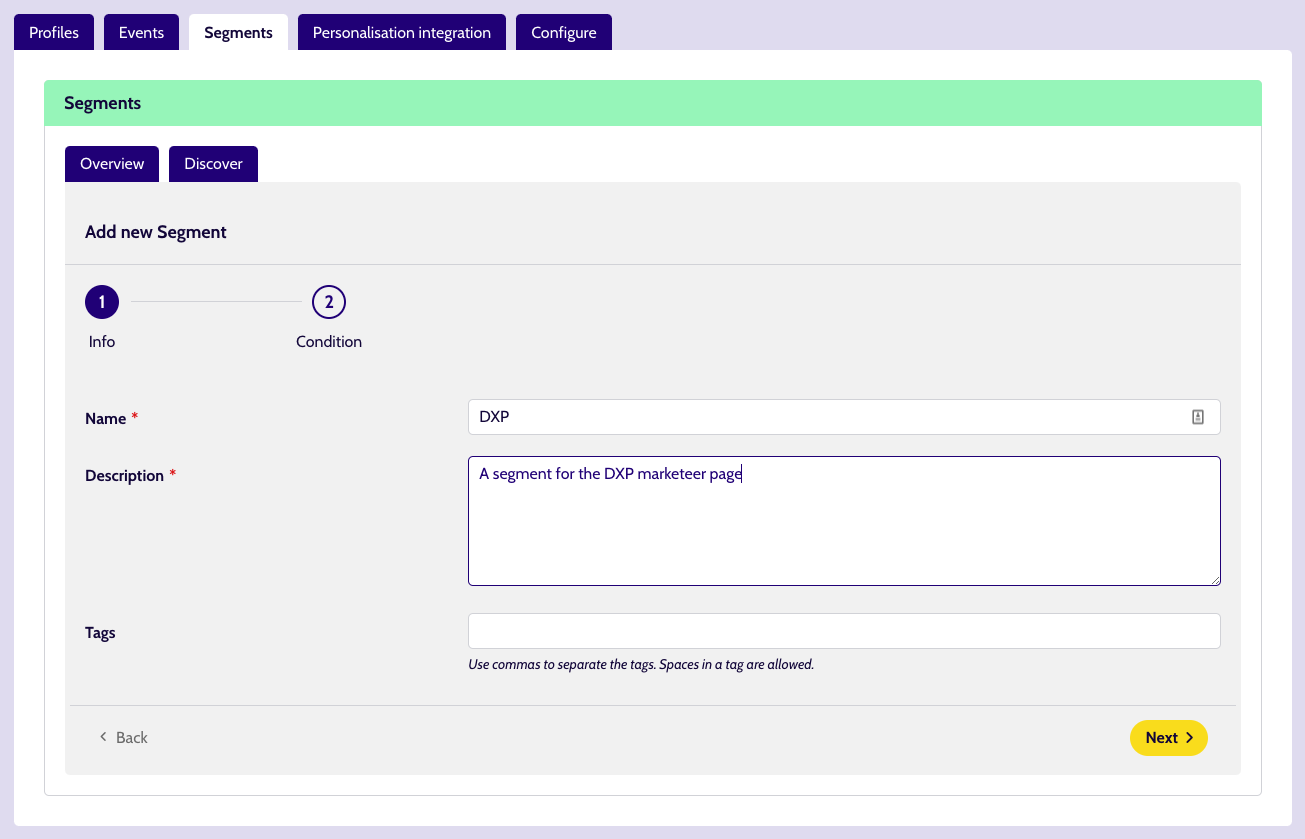
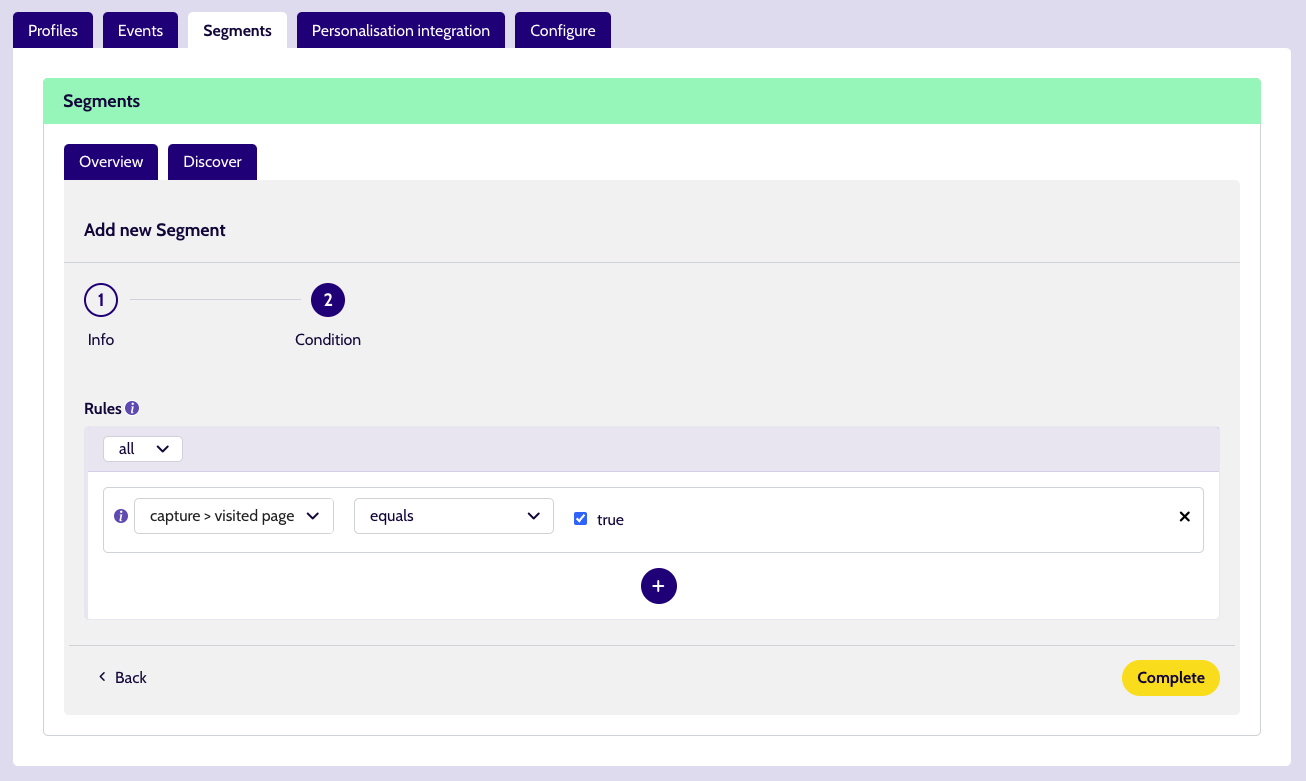
Now that we have the segment, we can integrate Mautic so it can receive the created segment.
Snippet 2
We create the custom fields necessary in Mautic to implement this example:
- 1 for the Unomi profile segment uuids
- 1 for the Unomi profile segment names
| Human readable label | Alias | Publicly updatable |
|---|---|---|
| personalisation segment uuid | personalisation_segment_u | Yes |
| personalisation segment label | personalisation_segment_l | Yes |
We use this snippet to get the segment names and uuids from the visitor's Unomi profile and send them to Mautic:
<script>
    // enable namespace that handles the queue and methods
    window.dsdc = window.dsdc || function () { (dsdc.q = dsdc.q || []).push(arguments) }; dsdc.l = +new Date;

    // this is a function to be able to compare 2 objects with each other
    // we use it to check if the user's Unomi segments have changed
    function shallowEqual(object1, object2) {
        if (object1 == null || object2 == null) {
            return false;
        }
        const keys1 = Object.keys(object1);
        const keys2 = Object.keys(object2);
        if (keys1.length !== keys2.length) {
            return false;
        }
        for (let key of keys1) {
            if (object1[key] !== object2[key]) {
                return false;
            }
        }
        return true;
    }

    // this is the function that reads the profile segment uuids and human readable names and sends them to Mautic
    var sendToMauticHandler = function (data) {
        // create a string of all the uuids of the segments, separated by ", "
        var segmentsUuid = data.responseData.profile.profileSegments.join(", ");

        // if the user doesn't belong to a segment, use the standard value "_unknown"
        if (segmentsUuid == "") {
            segmentsUuid = "_unknown";
        }

        // create a string of all the names of the segments, separated by ", "
        var segmentsNames = data.responseData.profile.profileSegmentNames.join(", ");

        // if the user doesn't belong to a segment, use the standard value "_unknown"
        if (segmentsNames == "") {
            segmentsNames = "_unknown";
        }

        // get the last known segments from localStorage
        var localSegmentObject = localStorage.getItem("myStoredUnomiSegments");

        // if there are segments stored in localStorage, parse the output to get an object
        if (localSegmentObject != null) {
            localSegmentObject = JSON.parse(localSegmentObject);
        }

        // create an object to send to Mautic
        var mauticObject = {
            "personalisation_segment_u": segmentsUuid,
            "personalisation_segment_l": segmentsNames
        };

        // check if there are properties to send to Mautic and if the Unomi segments changed to only send the segments to Mautic if they changed (to reduce the amount of pageviews being sent to Mautic)
        if (Object.keys(mauticObject).length > 0 && !shallowEqual(mauticObject, localSegmentObject)) {
            // only send Mautic event if there is at least one property to be sent and if the segments changed (with this we also detect name changes of segments)
            mt('send', 'pageview', mauticObject);
            // save the object that we sent to Mautic in localStorage, to use this to check if something changed later on
            localStorage.setItem("myStoredUnomiSegments", JSON.stringify(mauticObject));
        }
    }

    window.dsdc('afterResponse', sendToMauticHandler);
</script>
Test
We start on Dropsolid's What we do - Build page and interact with the page by clicking around a few times. By inspecting the page, we see that our Unomi profile does not have the DXP flag and therefore no segment.
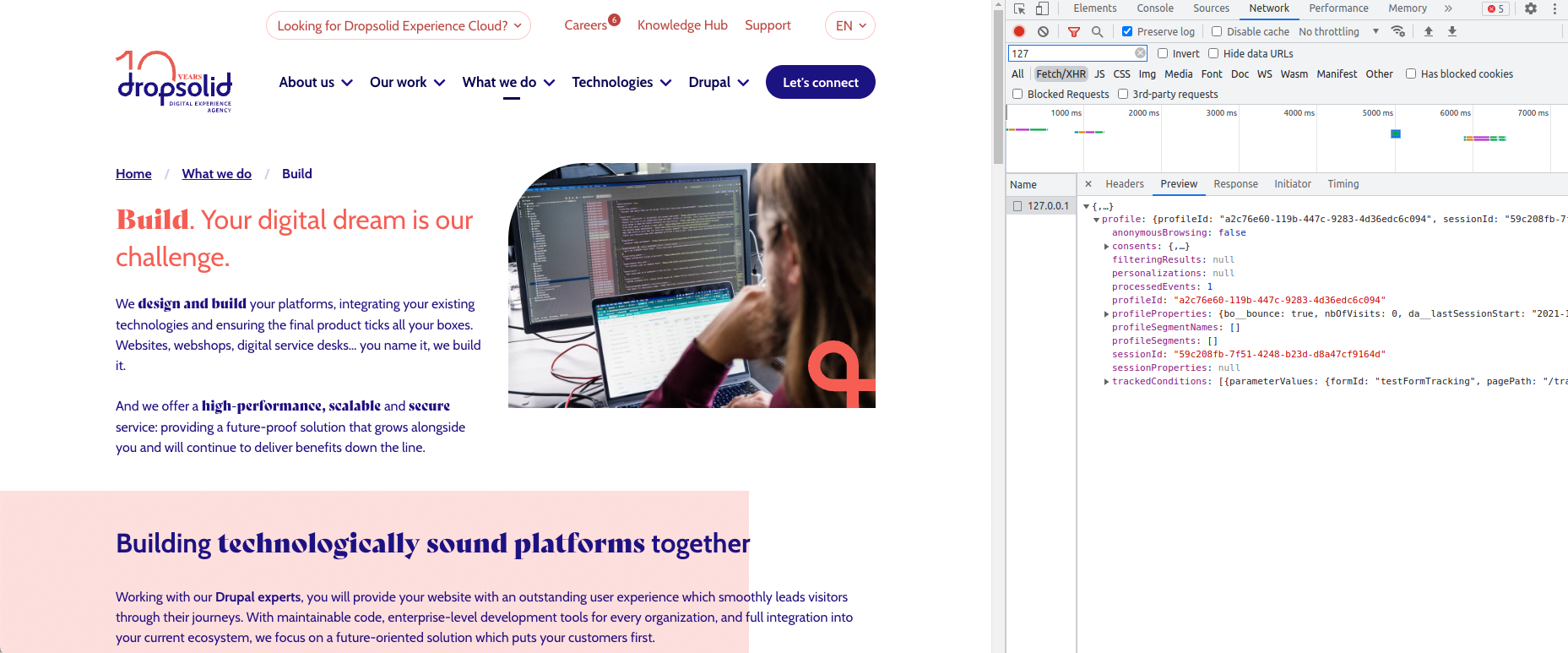
Next, we go to DXP marketing page. By inspecting the page, we see that Unomi has detected we visited the target page and assigned the DXP segment to our profile.
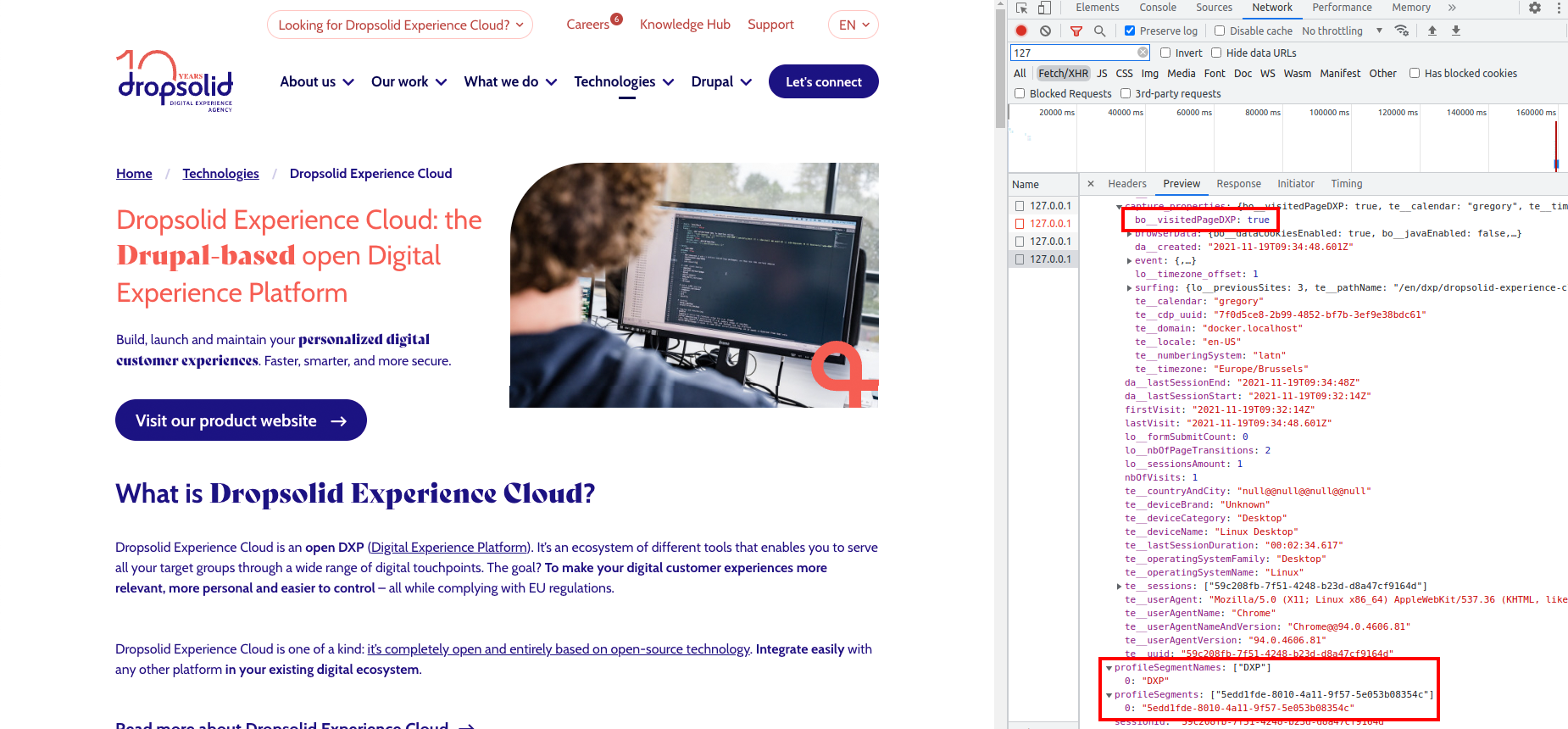
Our contact in Mautic is also enriched by the DXP segment that it received.
People interested in DXP can now be contacted with more relevant information for their needs!
I want to group my custom properties in the properties list for segments
We want to add some extra data about date and time to the capture.
But we also want this data to be grouped when we are making a segment, to be able to more easily find our custom data.
To do this, we have to group our data when adding it to the capture, before sending the capture to the API.
This snippet allows us to add our properties as a group to the capture and therefore to Unomi as well.
<script>
    window.dsdc = window.dsdc || function () { (dsdc.q = dsdc.q || []).push(arguments) }; dsdc.l = +new Date;

    window.dsdc('beforeRequest', function (data) {
        var changedCapture = data.requestData;

        var today = new Date();
        var thisYear = today.getFullYear();
        var thisMonth = today.getMonth();   // 1 = January, 12 = December
        var thisDayOfMonth = today.getDate();
        var thisDayOfWeek = today.getDay(); // 0 = Sunday, 6 = Saturday

        var thisHours = today.getHours();
        var thisMinutes = today.getMinutes();
        var thisSeconds = today.getSeconds();
        var thisTimeZoneOffset = -today.getTimezoneOffset()/60

        myCustomProperties = {
            "da__fullDate": today,
            "lo__year": thisYear,
            "lo__month": thisMonth,
            "lo__dayOfMonth": thisDayOfMonth,
            "lo__dayOfWeek": thisDayOfWeek,
            "time": {
                "lo__hours": thisHours,
                "lo__minutes": thisMinutes,
                "lo__seconds": thisSeconds,
                "lo__timeZoneOffset": thisTimeZoneOffset
            }
        };

        changedCapture.myCustomProperties = myCustomProperties;

        // use a global function to pass the modified capture back to the main script
        dsdc.updateCapture(changedCapture);
    });
</script>
We can then create a segment with these properties.
The dropdown will look like this:
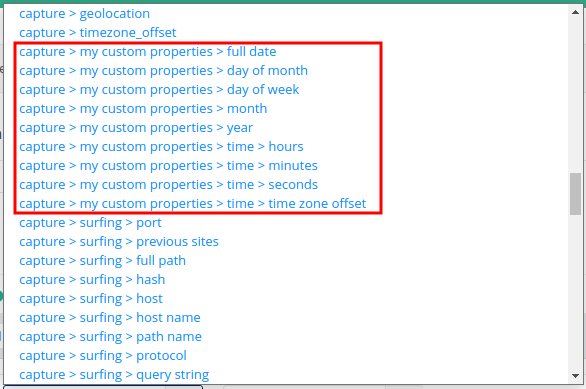
Note that this method will always result in your custom group being a part of capture >.
There is currently no way to change this.