How do I couple my domain to an environment
Manage domains for the environment
- Go to https://platform.dropsolid.com
-
Select your project & environment where you want to manage domains.
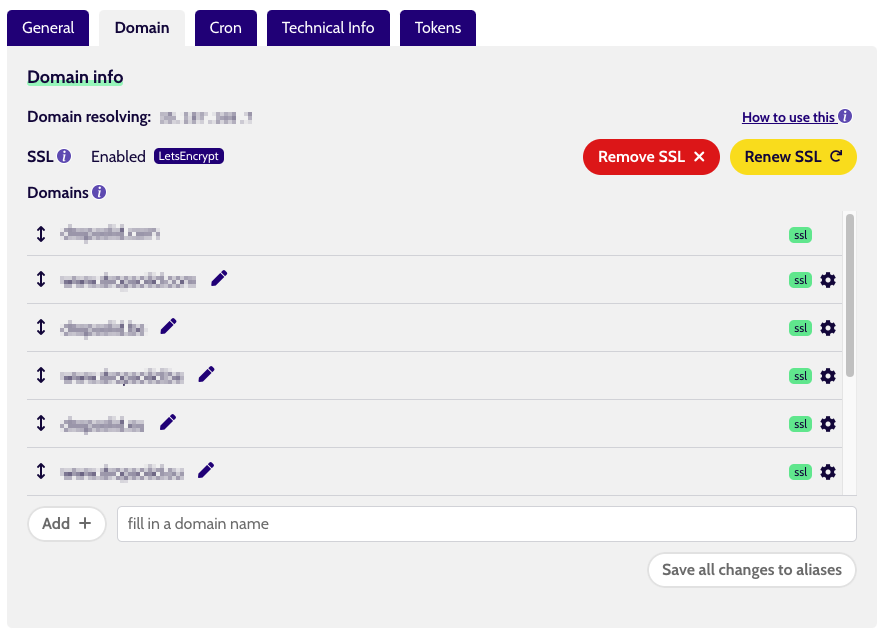
-
You can drag and drop domains to change the order, edit them using the pencil icon, or use the cogwheel icon to edit or remove them.
Info
Every environment has a “Protected domain” with which it was set up. Protected domains can not be edited or removed.
Any changes to protected domains need to be requested via a support ticket.
- To add a new domain:
- Type your required domain that you want to link to the environment next to the Add button.
- Click the add button & save all changes to active the changes.
Change your DNS to point to your project
In the screenshot above you can see our public IP from which you can resolve your website from.
A-record, or Address Record gives information about your host/domain name IP address. It is the link, the connection between your website’s name and the IP address of the machine your files are on.
So, to couple your domain to Dropsolid and, as a consequence, your project it is necessary to add an A record.
My domain has the format: https://myproject.be
Type: A
Name: @
Value: 35.187.168.7
My domain also has the format:https://www.myproject.be
Type: A
Name: www
Value:35.187.168.7
I'm managing my DNS with Combell/Gandi/GoDaddy/etc.. - Help?
No stress, you can find a list of the most used DNS providers here with instructions how to add or edit your DNS records.
Combell
https://support.combell.com/nl/wat-is-een-a-record-hoe-kan-ik-het-aanmaken-wijzigen/71
Gandi
https://docs.gandi.net/en/domain_names/common_operations/dns_records.html
GoDaddy