Projects: Overview
There are at least 2 types of roles that have access to the DevOps Focus, some type of Architect and a Developer. The difference is that the Architect has more permissions and can do things like creating and deleting projects.
We’ll go over where to find what information about Projects and Environments, and look at how things are managed.
Your main base of operations will be the overview page. Here you can find a list of all the Projects managed by the Organization(s) you belong to and are accessible by you.
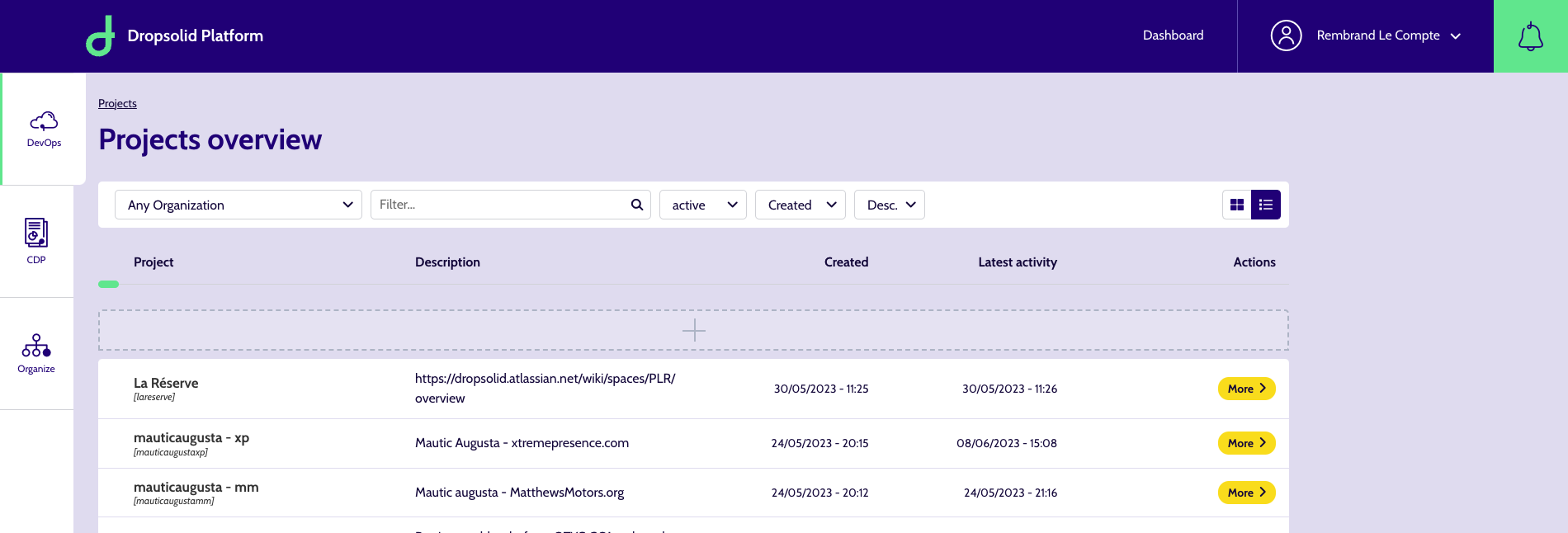
You can see a filter bar which allows you to filter and sort using a variety of factors:
- organization
- Status: eg. active, archived, …
- Sort by: by default it’s chronologically
- Sort direction: by default, it’s descending → so you’ll see the newest ones first
You can also change the display from a list to cards, by using the icons on the right of the filter bar.

There is also a Filter field, which you can use to search for specific Projects. It has autosuggestion, so you don’t have to input the complete name.
It will also display the environment names when you click on a project arrow.


With the right role, you may have permission to create a new Project. This is done by clicking the '+' item in the Projects overview list/grid, which brings you to the creation page.
For more information on how to create a project, see these documentation pages.